2014–2016 Mobile Star Awards Sponsor & Winner:
Enterprise Mobile Collaboration – Brainshark Sales Accelerator (2016 only)
Enterprise Mobile Field Sales & CRM – Brainshark Sales Accelerator
2012 & 2013 Mobile Star Awards Winner:
Enterprise Mobile Presentations – SlideShark
Company Profile:

Brainshark
130 Turner St., Building 1
Waltham, MA 02453
Tel: (+1) 781-370-8000
info [at] brainshark.com
brainshark.com
Structure: Private Company, established in 1999
Number of Employees: Approx. 250
OS Supported: All Platforms
How Brainshark Accelerates Your Sales:
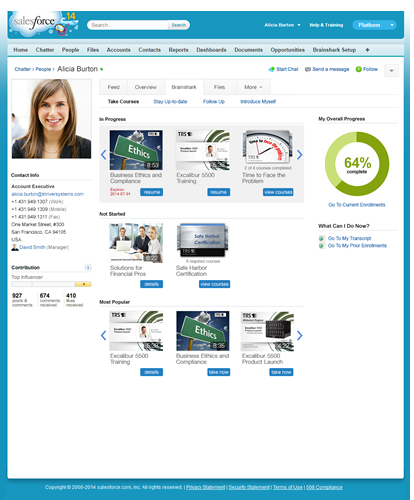 The Brainshark Sales Accelerator (see product page) is the award-winning sales enablement platform from Brainshark. It provides high-impact, centrally accessible solutions for sales onboarding, continuous learning, coaching, prospecting, presentations and engagement. Reps can access the right content, when and how they need it, across all major mobile platforms – helping them win more deals in less time. Powerful analytics give actionable insights into how deals are won.
The Sales Accelerator addresses common and persistent problems for sales teams today.
The TAS Group reports that 67% of reps miss quota – which, according to SiriusDecisions, is most often due to failure to articulate value in conversations. Furthermore, Forrester reports that executives deem nine out of 10 sales conversations a waste of time.
By providing the training, coaching, content and analytic tools for success, the Sales Accelerator is a one-stop shop for sales enablement: equipping reps to have smarter conversations, while improving sales team productivity, effectiveness and results.
Brainshark Sales Accelerator features:
 — Native integration with the CRM system (Salesforce) – putting all the resources reps need at their fingertips. Companies maximize the ROI of CRM investments – so the workflow of reps (and, by extension, the reps themselves) live within the system, and so reps view it as valuable and inextricable to selling.
— Ability to rapidly create high-impact, mobile-ready videos for training, prospecting and more.
— Delivers, as Network World notes, “engaging content in the context of the sales workflow,” accessible on computers, smartphones and tablets. The system serves up the right materials (based on persona, industry, sales cycle stage, etc.) to reps at the right time, so they’re prepared for each unique selling situation.
— Integrated onboarding workflow, where reps see what courses they need to take/progress. Just-in-time and formal learning content is also just a click (or tap/swipe) away.
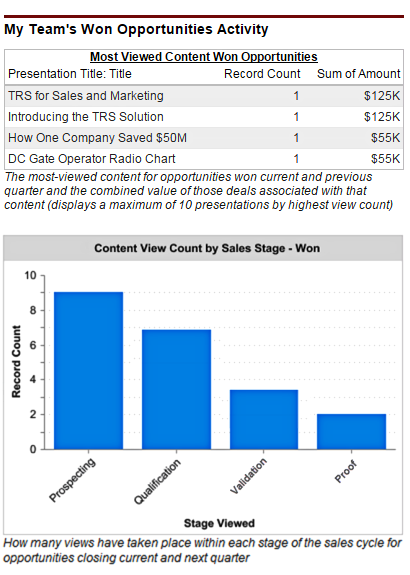
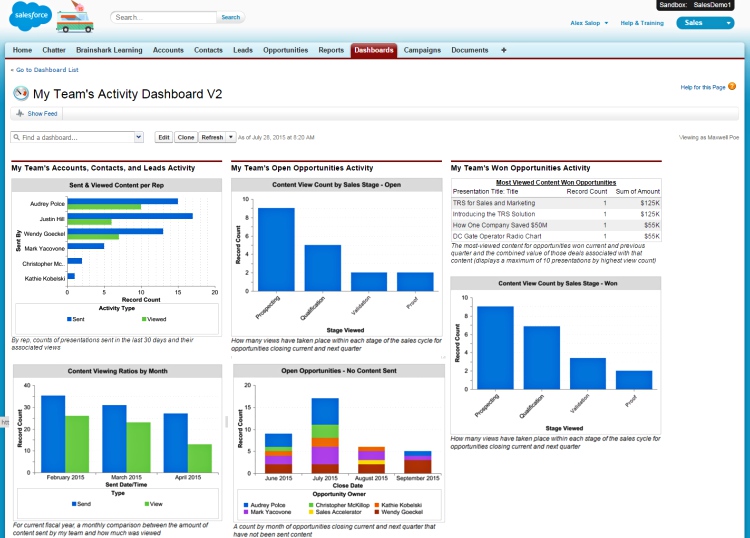
— Analytics, illuminating the former “black hole” of sales conversations. Managers – unable to attend every pitch or training session – have traditionally struggled to see where conversations veer wrong. With the Sales Accelerator’s analytics, they can see how reps’ knowledge, behavior and content used impact deals – helping them coach ‘B’ reps to perform more like ‘A’ players. In addition, managers can track their team’s preparedness to sell, identify best practices and improve forecasting accuracy. Reps, meanwhile, can see who is consuming their content/when interest is hot.
Frequently used in technology, financial services, insurance, manufacturing, healthcare and medical device industries, the Brainshark Sales Accelerator helps sales teams improve productivity in the field and overall results.
Recent Brainshark News:
Introducing the New Brainshark User Interface!
Presenting the 2017 Sharkie Award Winners
Brainshark and Seismic Strategic Partnership: What It All Means
New! Integrate Brainshark Training and Coaching to Better Assess Mastery